Detractor Email
When a respondent gives a bad rating, an email notification can be sent out to the supervisor notifying them about the detractor.
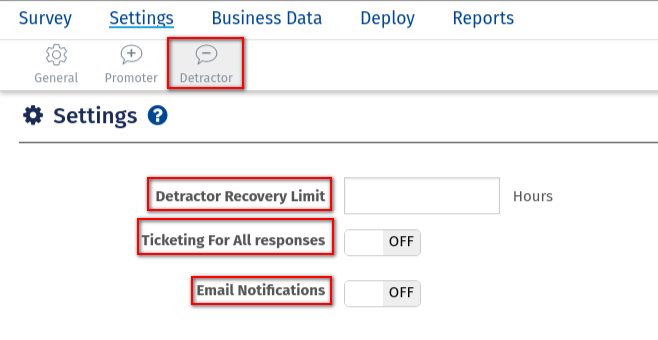
What are the options under Settings?
The options under Settings are as follows:
- Detractor Recovery Limit: Enter the detractor recovery limit in Hours
- Resting Period: Enter the resting period in days.
- Ticketing For All responses: Mention if you need tickets for all responses
- Email Notification:: Mention if you need tickets email notifications
- Scroll to the bottom of the page and click on Save
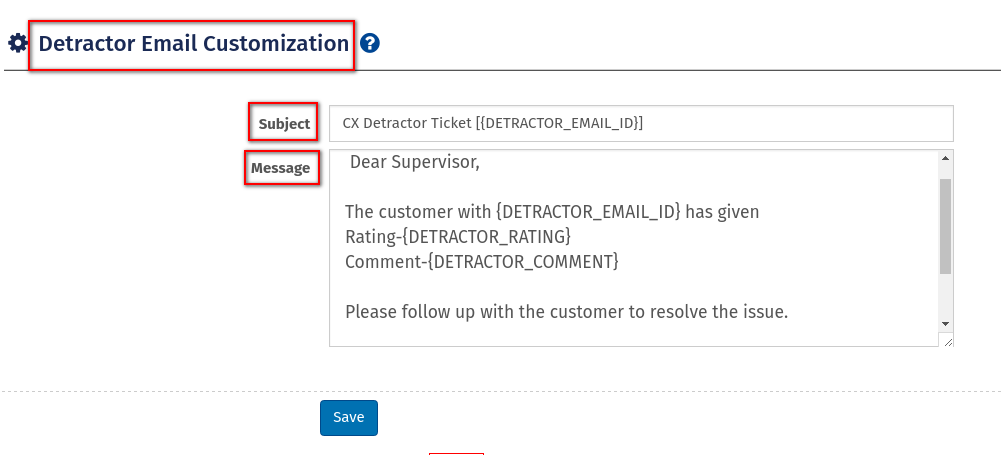
To access the Detractor Email, go to:
- Login » CX » Settings » Detractor Email Customization
- Subject: Customise the subject line.
- Message: Customise the message.
- Scroll to the bottom of the page and click on Save Settings.
 Back
Back Print
Print